
Information Technology Services

Upcoming Encryption Updates to Managed Devices

Over the next month, ITS will encrypt all George Mason-managed Windows and Mac devices.

This update is part of the ITS Endpoint Management Program to improve system security across the university. Encryption helps to protect George Mason data in the event your device is lost or stolen.

The change will occur in the background and will not impact system applications or external drives.

What to Expect

  • Mac Users: The Mac update will occur on Tuesday, June 24. Users will see a one-time pop-up notification upon signing into their devices to acknowledge the new encryption process.
  • Windows Users: The Windows update will occur on Tuesday, July 8. No action is required.

To learn more about managed devices, see ITS Computer Standards.

If you have any questions or require assistance, please contact ITS Support at 703-993-8870 or via https://its.gmu.edu/chat/.
ClearPass Certificate Update on August 14

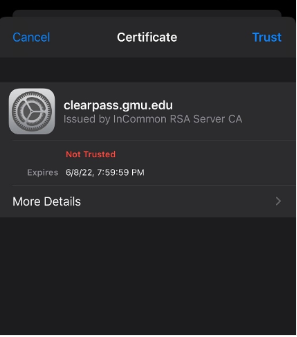
On Thursday, August 14, Information Technology Services (ITS) will install the new annual ClearPass certificate.

After the update, users may be prompted to trust the root certificate authority when connecting to George Mason Wi-Fi networks.

If you are prompted to trust the new Certificate, select Trust.

If you have any questions or need help connecting to the network after the update, please contact ITS Support at 703-993-8870 or via chat.

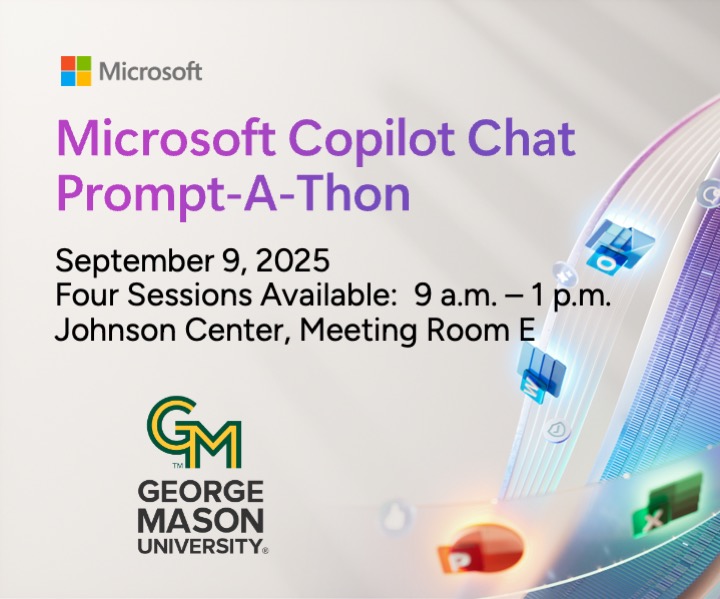
Microsoft Copilot Chat Prompt-A-Thon | Register now!

Curious about AI tools available at George Mason or how Microsoft Copilot Chat can assist with day-to-day tasks? Discover how Copilot Chat can supercharge your productivity!

Join us on Tuesday, September 9, for the Copilot Chat Prompt-A-Thon, a hands-on event hosted by George Mason University and Microsoft.

This event is open to students, faculty, and staff, and is designed to help you explore how Copilot Chat can enhance your daily routines through the power of generative AI. Each session offers expert-led prompt training to help users try their hand at using Copilot Chat as well as learning how to maximize its capabilities.

Register Now:

Faculty/Staff:

Register via MasonLEAPS

Students:

Register via MS Form

Events Details:

  • Tuesday, September 9
  • Four (4) Sessions Available:
    • 9:00 – 9:55 a.m.
    • 10:00 – 10:55 a.m.
    • 11:00 – 11:55 a.m.
    • 12:00 – 12:55 p.m.
  • Johnson Center, Meeting Room E (third floor)
  • This event is BYOD (bring your own device)

What To Expect:

  • A live immersive Copilot Chat demo 
    Experience the full power of Copilot Chat in person
  • Training sessions
    Product demos, in-depth training, and usage scenarios
  • Hands-on experimentation
    Experience Copilot Chat in action using the Microsoft 365 applications

Cybersecurity Awareness Month 2025

October is the annual observance for Cybersecurity Awareness Month (CAM). It is sponsored by the National Cybersecurity Alliance, with the theme “Stay Safe Online.” 

In observance of CAM 2025, Information Technology Service (ITS) will have several events for the George Mason University community: 

  • ITS will post daily cybersecurity tips throughout October on social media @GeorgeMasonITS. 
  • Join IT Security Office staff for cybersecurity trivia from 11:30 a.m. to 1 p.m. on Tuesday, October 7, in the Johnson Center at Kiosk C. Come by to test your knowledge about cybersecurity and win prizes for correct answers! 
  • From 11 a.m. to 2 p.m. on Tuesday, October 14, join the IT Security Office staff on Reddit for an Ask Me Anything thread. 

Managed Operating System Updates

Managed Operating System Updates

  • macOS: On Monday, September 15, Apple released the newest version of macOS. To ensure all George Mason software and services can be supported, ITS will prevent upgrades on managed systems to this new version for 30 days. Once confirmed, all systems that support macOS 26 Tahoe will be upgraded. Systems that do not support macOS 26 Tahoe will be upgraded to its highest possible macOS version. As a result of these changes, Apple is ending support of macOS 13 Ventura. Systems still running macOS 13 Ventura after the release of macOS 26 Tahoe will be removed from the George Mason network. If needed, please coordinate with your department to receive a new device.
  • Windows 11: Microsoft will end support of Windows 10 this fall on Tuesday, October 14. In anticipation, ITS has been gradually upgrading managed Windows 10 systems to Windows 11. As a reminder, users can self-upgrade their systems at any time through their device’s Software Center. If your system does not support Windows 11, please coordinate with your department to receive a new device. Systems still running Windows 10 after end of support are subject to removal from the George Mason network. For more information, see the Windows 11 Roadmap.